Why this can be better
A visual summary can focus attention faster than rebuilding a report from scattered files.
Comparison: a disconnected manual process, not a claim that competitors lack this capability.Twelve worked examples connect the app’s main workflow areas to the decisions, handoffs, and customer experiences behind repeat business.
Fictional scenarios and illustrative pictures—not captured app screens. They explain documented workflow intent; current-release capability and commercial scope must be verified in a live demo.
The sales manager reviews an illustrative June result of $91,000 and wants to understand what drove it.
The image illustrates this area, not necessarily the exact transaction described.
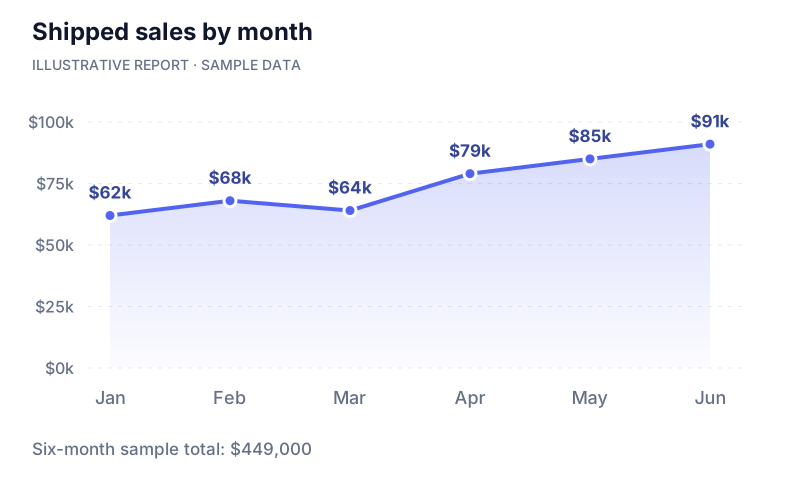
Agree that this example represents shipped sales, not orders or cash receipts.
Compare June with the earlier sample months and identify a question worth investigating.
Ask to trace the result to products and accounts in the current release; drill-down is a requirement to confirm.
Have the account owner review the relevant relationship before deciding on a follow-up.
A visual summary can focus attention faster than rebuilding a report from scattered files.
Comparison: a disconnected manual process, not a claim that competitors lack this capability.Better-targeted follow-up may uncover reorder opportunities; the chart itself does not create a sale.
Track qualified follow-ups and the orders they generate.
Require a live demonstration: Report definitions, filters, refresh timing, and drill-down must be verified.
Discuss this workflow ↗Avery works with Coastal Beverage and Harbor Distribution and needs to enter an order for Coastal.
The image illustrates this area, not necessarily the exact transaction described.
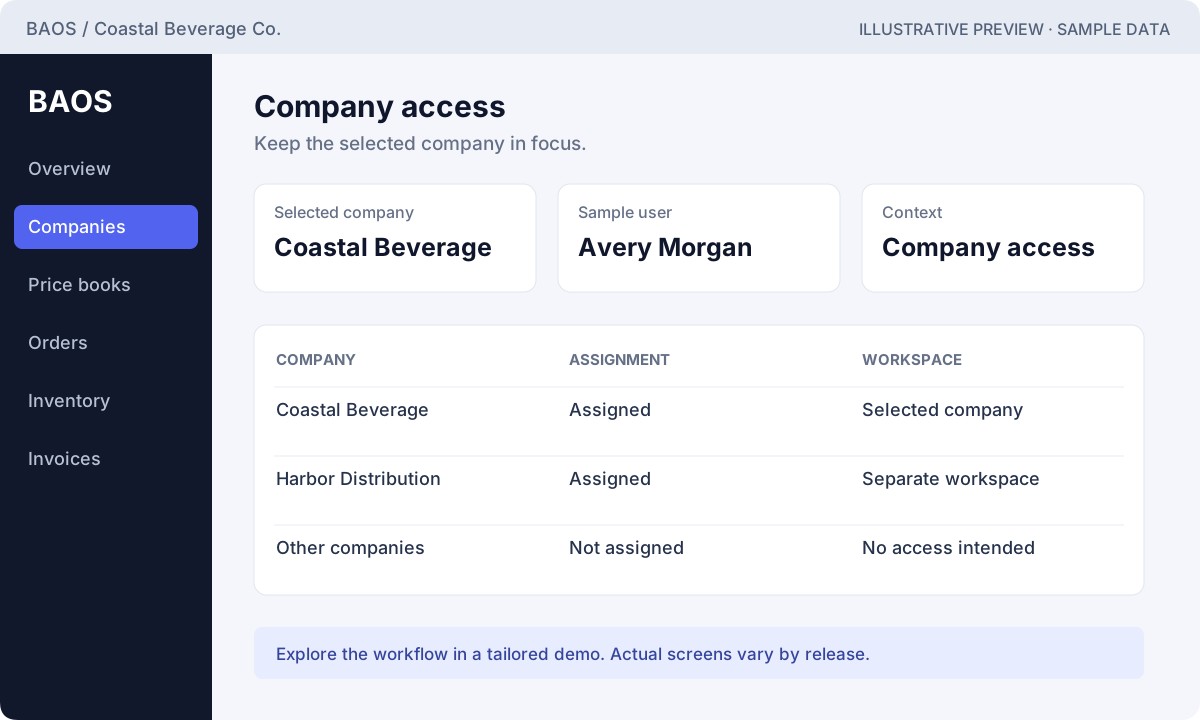
Confirm which operating company owns the customer and transaction.
Choose an assigned company and verify the visible company context.
Use that company’s accounts, products, and operational database for the order.
In the pilot, switch companies and prove that unauthorized records remain inaccessible.
An intentional company boundary is clearer than relying on someone to choose the correct spreadsheet.
Comparison: a disconnected manual process, not a claim that competitors lack this capability.Avoiding company mix-ups can protect customer trust and reduce time spent correcting orders.
Count cross-company corrections and time to resolve them.
Require a live demonstration: Demonstrate both allowed and denied access with representative identities.
Discuss this workflow ↗Harbor House asks for another shipment, but its buyer has changed and it has a new delivery location.
The image illustrates this area, not necessarily the exact transaction described.
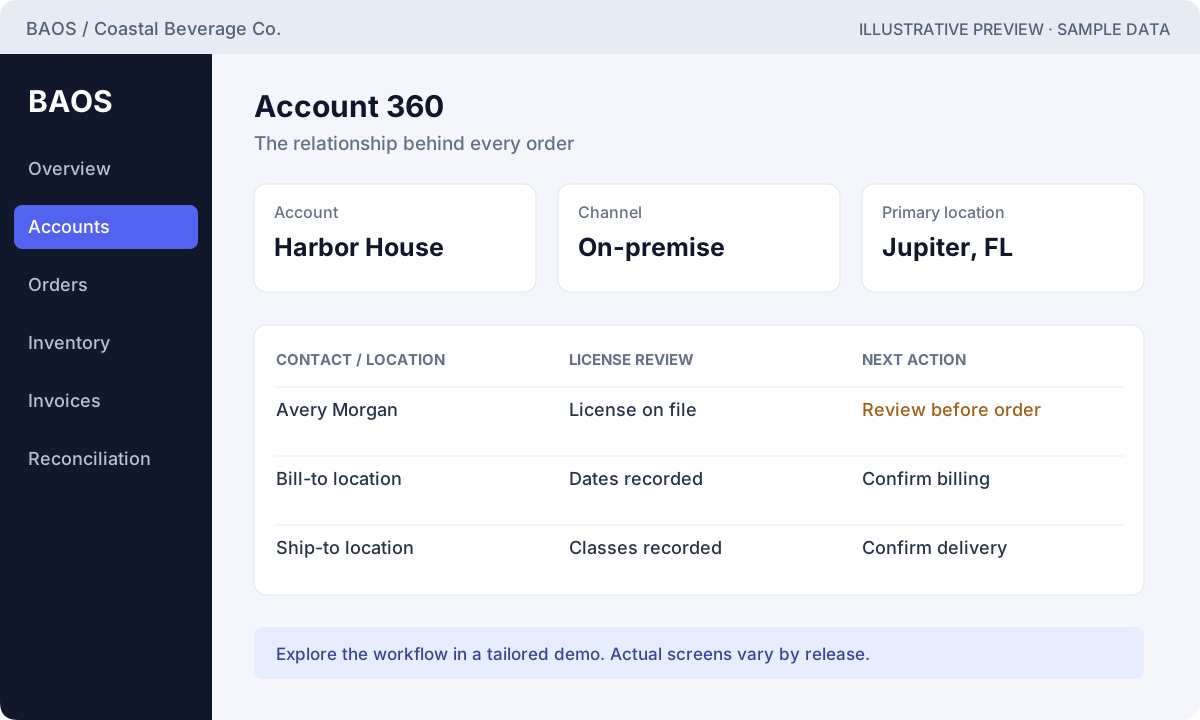
Open the existing customer instead of creating a duplicate record.
Review the buyer’s contact details and update the correct account context.
Confirm bill-to and ship-to records and the license information associated with the destination.
Use the verified account and locations as the starting point for the next draft.
Connected customer context reduces the need to assemble the story from multiple messages.
Comparison: a disconnected manual process, not a claim that competitors lack this capability.A more accurate response can remove friction from repeat buying and leave more time for the customer.
Measure time from reorder request to a complete draft.
Require a live demonstration: Confirm account editing, location ownership, and history in the release being evaluated.
Discuss this workflow ↗An order review identifies that a destination license needs attention. The team must investigate before proceeding.
The image illustrates this area, not necessarily the exact transaction described.
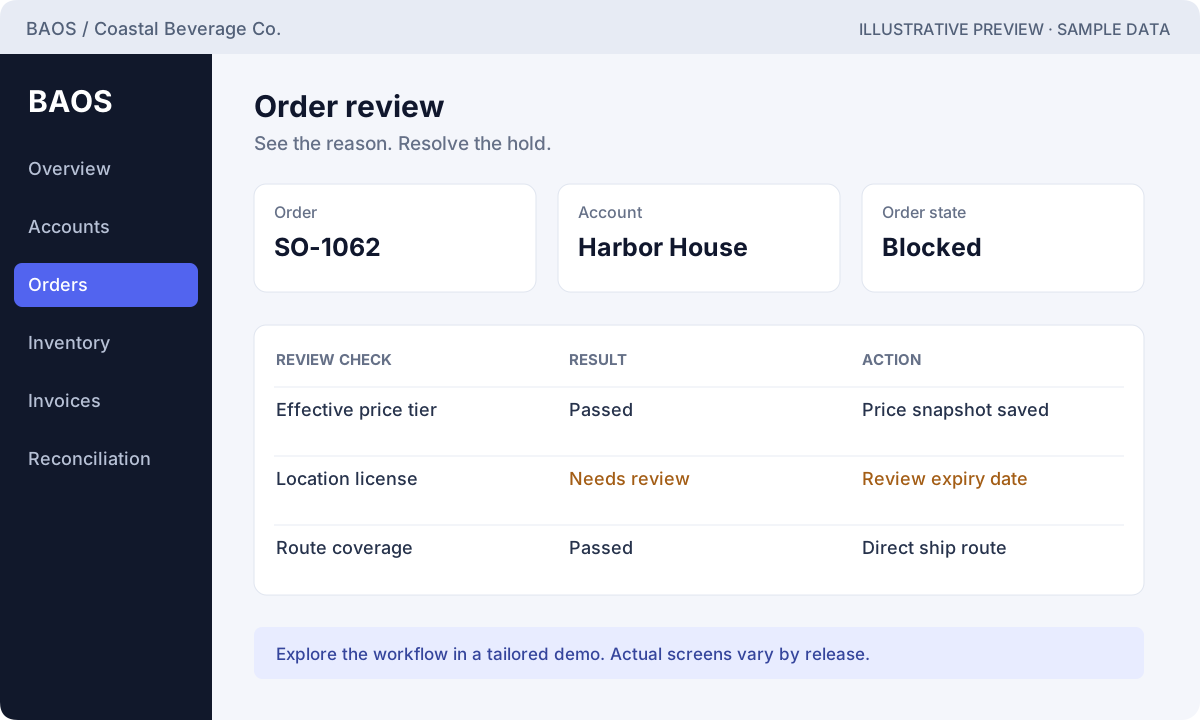
Check the destination’s license dates, classes, and recorded restrictions.
Run the documented order checks rather than assume a license record alone means approval.
Have the responsible person review the evidence and correct legitimate account or license information.
Re-run evaluation and review the recorded result before the next operational step.
A visible result and history make a hold easier to investigate than an unexplained message.
Comparison: a disconnected manual process, not a claim that competitors lack this capability.Resolving valid issues earlier may reduce avoidable order delay; controls must never be bypassed to make a sale.
Track avoidable review delays and the causes of blocked orders.
Require a live demonstration: Jurisdiction-specific rules and evidence requirements must be scoped; no blanket compliance guarantee.
Discuss this workflow ↗Harbor House requests 12 cases. A fictional price book lists $180 for 1–9 cases and $174 for 10–24.
The image illustrates this area, not necessarily the exact transaction described.
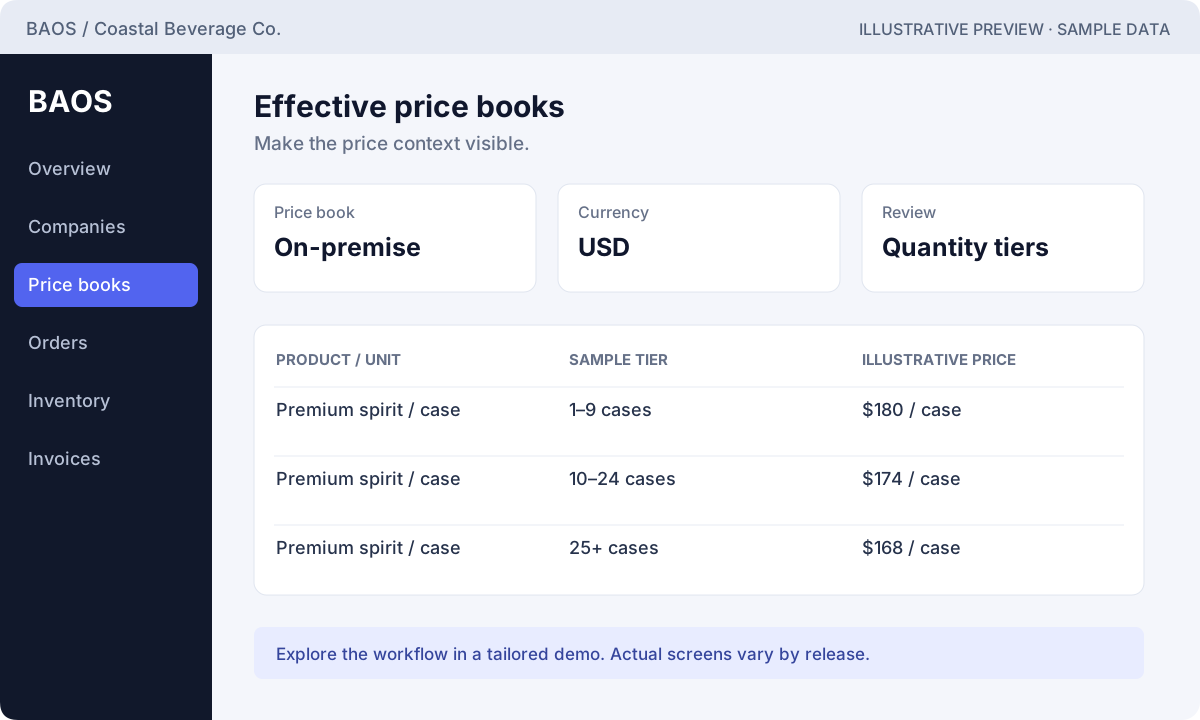
Confirm the SKU, case packaging, and unit being sold.
Review the applicable price book and dates; 12 cases fit the example 10–24 tier.
At $174 per case, the illustrative line subtotal is $2,088 before tax, freight, or adjustments.
Confirm the server validates the selected tier and the saved order retains its pricing snapshot.
Effective tiers and saved pricing context provide a clearer basis than copying a price from an old file.
Comparison: a disconnected manual process, not a claim that competitors lack this capability.Fewer quote corrections may reduce buying friction while helping protect the intended price.
Measure quote corrections and time from quote request to accepted order.
Require a live demonstration: Verify effective dates, quantity tiers, permitted adjustments, and price snapshots.
Discuss this workflow ↗The rep creates the 12-case Harbor House draft and discovers a review issue before approval.
The image illustrates this area, not necessarily the exact transaction described.
Select the account, locations, effective pricing, product, and quantity.
Confirm the line calculation and any supported charges or adjustments.
Review the recorded approval or block outcome and its individual check results.
Resolve a legitimate issue and resubmit. Only continue to fulfillment after the required approval.
Recorded status and reasons are easier to hand off than an email saying the order is “probably ready.”
Comparison: a disconnected manual process, not a claim that competitors lack this capability.Less avoidable rework may help the team respond and fulfill sooner, supporting customer confidence.
Measure complete drafts, approval time, and corrections per order.
Require a live demonstration: Demonstrate product-line entry and submission in the actual release; do not infer these from a mockup.
Discuss this workflow ↗The warehouse receives an approved 12-case order and needs to review stock before release.
The image illustrates this area, not necessarily the exact transaction described.
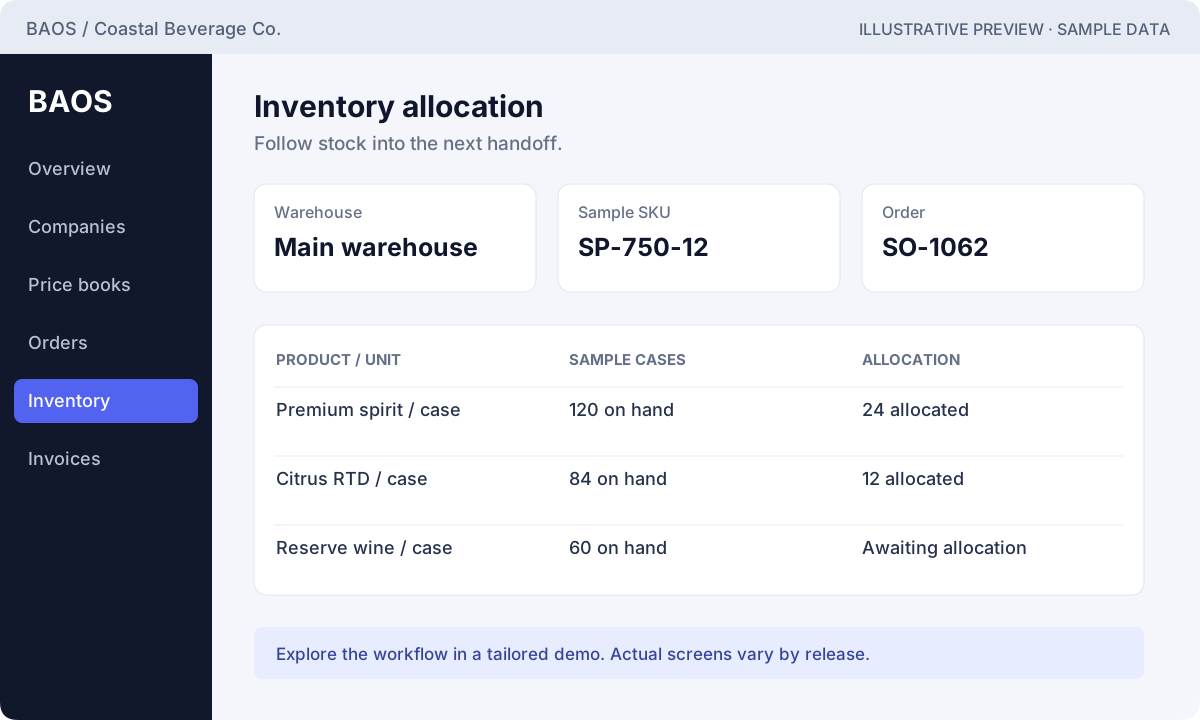
Confirm the warehouse, SKU, unit, and the current stock records.
Reserve the required quantity using the available workflow and review any shortage.
Confirm the order’s allocation and release state with the fulfillment owner.
Use movement history and the actual warehouse process to resolve discrepancies.
Order-linked allocation provides a stronger handoff than separate stock and order spreadsheets.
Comparison: a disconnected manual process, not a claim that competitors lack this capability.A more dependable stock conversation can reduce avoidable customer disappointment and protect repeat orders.
Track shortages discovered after commitment and fulfillment exceptions.
Require a live demonstration: Verify units, locations, availability rules, and allocation behavior in your pilot.
Discuss this workflow ↗The allocated Harbor House order needs to move through release, shipment, and delivery confirmation.
The image illustrates this area, not necessarily the exact transaction described.
Confirm the approved, allocated order is ready for the next warehouse action.
Use the supported shipment workflow and retain the relevant order context.
Review the documented delivery stage and record the supported completion details.
Confirm the order is eligible for the agreed invoice process.
A shared sequence makes status questions easier to investigate than checking several separate logs.
Comparison: a disconnected manual process, not a claim that competitors lack this capability.More reliable handoffs may support repeat buying by reducing uncertainty about the order.
Measure on-time completion using your agreed promise date and definition.
Require a live demonstration: Route optimization, driver tracking, and proof-of-delivery depth are separate capabilities to verify.
Discuss this workflow ↗Finance needs to invoice the fulfilled Harbor House order without re-entering its commercial context.
The image illustrates this area, not necessarily the exact transaction described.
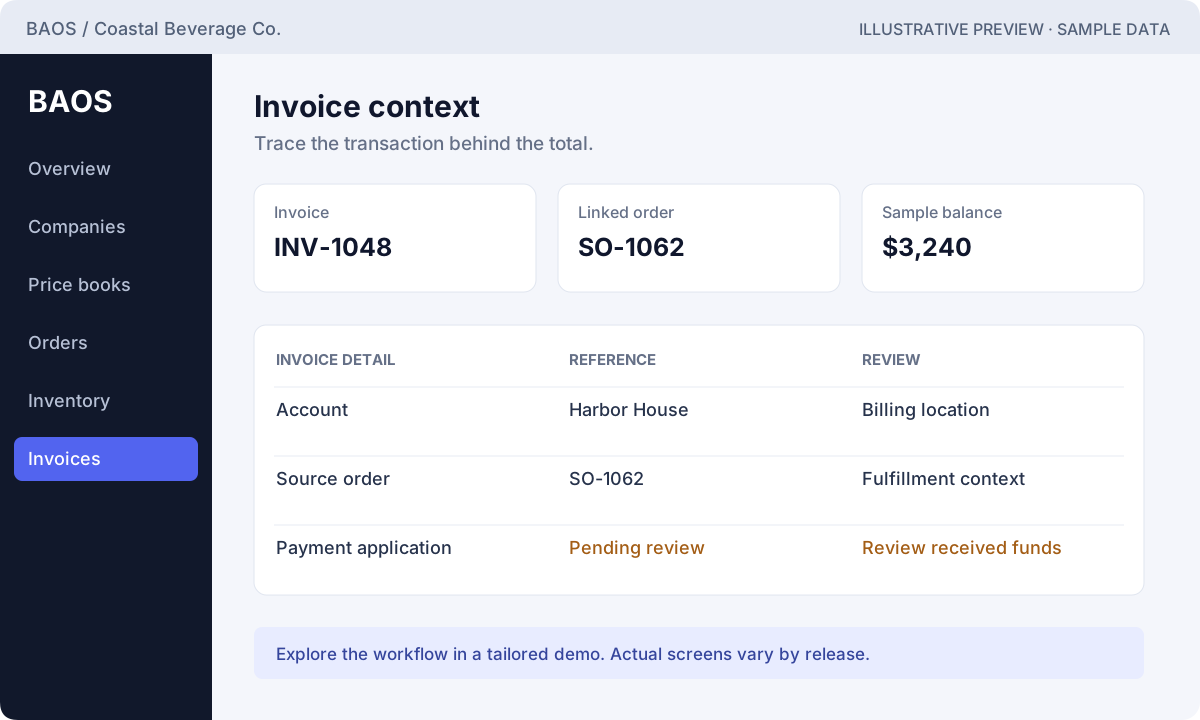
Confirm the fulfillment/delivery condition required by the current invoice workflow.
Carry the supported order context into the invoice and review its calculation.
Trace the invoice to its source order and customer records.
Verify available sending, export, or printing options; none is assumed from this illustration.
Order linkage gives finance a clearer explanation than rebuilding an invoice from a separate worksheet.
Comparison: a disconnected manual process, not a claim that competitors lack this capability.Fewer billing questions may improve the customer experience; invoicing alone does not increase revenue.
Track invoice corrections, disputes, and time from fulfillment to billing.
Require a live demonstration: Verify invoice generation, numbering, adjustments, and required print/export capabilities.
Discuss this workflow ↗Finance receives a supported payment file and must avoid importing the same transaction twice.
The image illustrates this area, not necessarily the exact transaction described.
Verify the enabled connection, supported format, and activation status before any transmission.
Use the supported import identity and review duplicate handling.
Investigate unmatched records and confirm the payment belongs to the intended invoice.
Apply the payment through the documented workflow and review the remaining balance.
An explicit import and matching workflow is easier to audit than editing a paid flag in a spreadsheet.
Comparison: a disconnected manual process, not a claim that competitors lack this capability.Less payment confusion may remove friction from future orders, subject to your own credit policies.
Measure duplicate corrections and the time to investigate unmatched payments.
Require a live demonstration: Live provider activation and fees must be confirmed; this marketing site does not charge buyers.
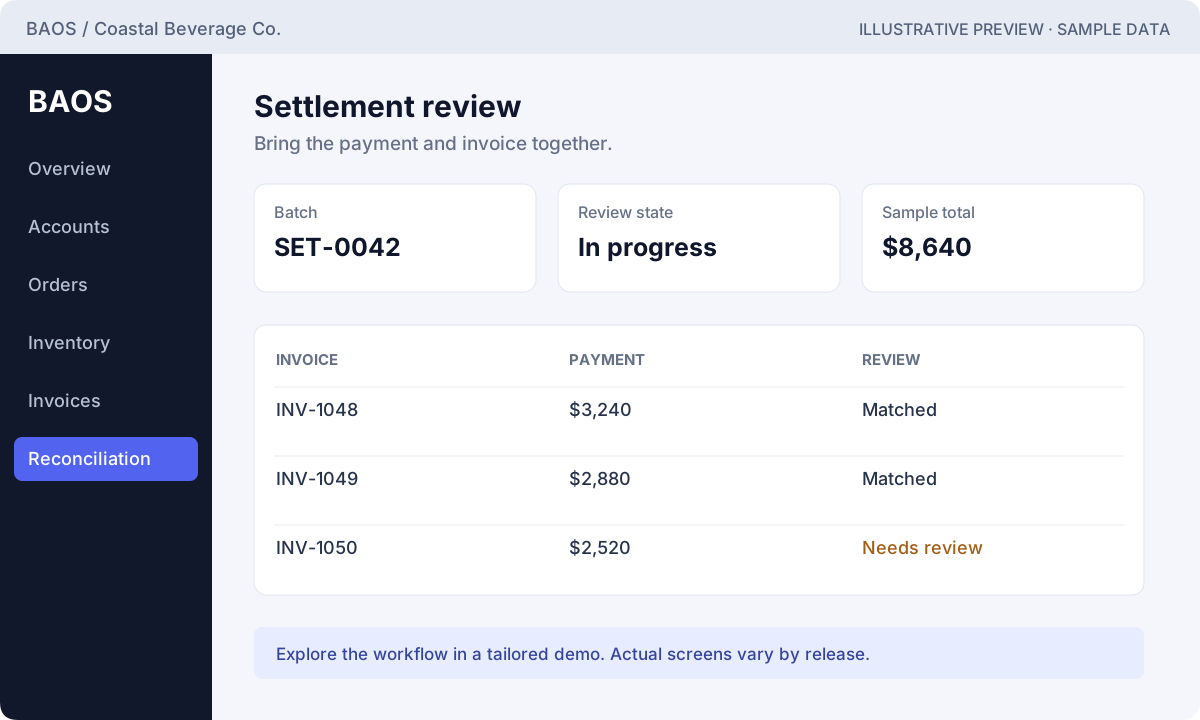
Discuss this workflow ↗A sample settlement contains three invoice payments totaling $8,640, with one row requiring review.
The image illustrates this area, not necessarily the exact transaction described.
Identify the settlement and its expected total using the supported records.
Check invoice/payment associations and the exception needing attention.
Investigate the underlying record rather than force the total to balance.
Confirm the batch meets the documented balancing requirements before closure.
An explicit balanced close is a clearer control than treating a spreadsheet total as proof of reconciliation.
Comparison: a disconnected manual process, not a claim that competitors lack this capability.Reducing back-office investigation may free capacity for growth; it is an operational benefit, not new sales by itself.
Measure unresolved settlement items and time to a verified close.
Require a live demonstration: Demonstrate an unbalanced batch being held and a corrected batch closing.
Discuss this workflow ↗A distributor sell-through file contains a SKU the company has not matched yet.
The image illustrates this area, not necessarily the exact transaction described.
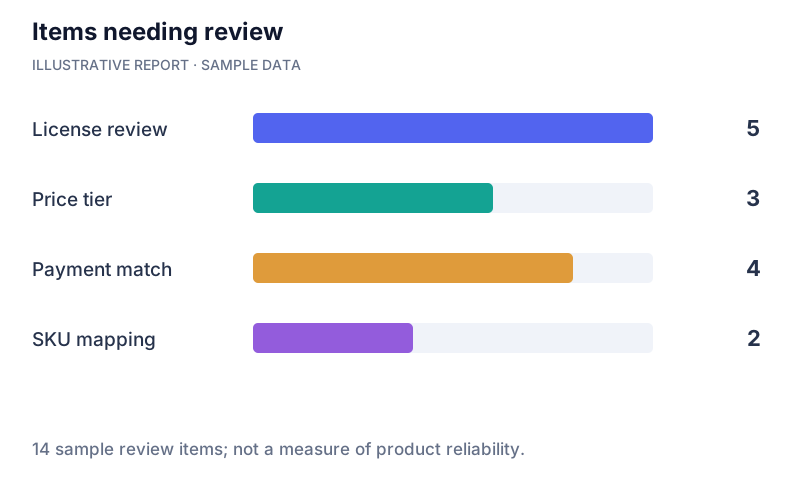
Confirm distributor, period, identifiers, and the supported import format.
Use the documented depletion workflow and review its matching results.
Investigate the unmatched account or SKU before relying on the row.
Ask how the current release supports reviewing the corrected data and planning account follow-up.
Visible matching exceptions make data quality easier to discuss than silently accepting every row.
Comparison: a disconnected manual process, not a claim that competitors lack this capability.Better-understood sell-through may support more relevant account conversations; it does not prove consumer demand by itself.
Track unmatched rows and follow-ups informed by validated data.
Require a live demonstration: Confirm matching rules, duplicate handling, available analysis, and reporting depth.
Discuss this workflow ↗Walk through the same scenario with BAOS Global and the alternatives. Choose on demonstrated fit and agreed scope.